> ## Documentation Index
> Fetch the complete documentation index at: https://langchain-5e9cc07a-preview-docsby-1791319236-3be7a15.mintlify.site/llms.txt
> Use this file to discover all available pages before exploring further.

# Model fallbacks

> Automatically retry a request against backup models when the primary model rate-limits, errors, or returns another configured status code.

<Note>
  The LLM Gateway is in [beta](/langsmith/release-stages).
</Note>

Model fallbacks retry a request against one or more backup models when the primary model returns a configured error, such as a rate limit or provider outage. Define the fallback order once in LangSmith, then continue using the standard LLM Gateway endpoint and model ID in your application.

## How it works

A fallback chain has:

* **A primary model**: the provider and model that trigger the chain when a request fails.
* **One to five fallbacks**: an ordered list of direct provider models or saved [model configurations](/langsmith/model-configurations).
* **Triggers**: the upstream HTTP status codes that move the request to the next model. For example, use `429` for rate limits, or `500`, `502`, `503`, and `504` for provider errors.

For each request, the gateway:

1. Calls the primary model selected by the request's provider-prefixed model ID.
2. If the request fails with a configured trigger status or a transport error, loads the matching fallback chain.
3. Calls each fallback in order until one succeeds, returns a status that does not trigger another fallback, or the chain is exhausted.
4. Returns the final response in the API format used by the client.

Fallbacks can use a different provider and API format than the primary model. The gateway translates requests and responses between [supported API formats](/langsmith/llm-gateway-api-formats), so an Anthropic primary can fall back to an OpenAI model without client-side changes.

Each attempt is traced and counted against [spend policies](/langsmith/llm-gateway-spend-policies) separately. A request that uses two fallbacks records three model calls: the primary attempt and two fallback attempts.

## Create a fallback chain

<Warning>
  Creating and managing fallback chains requires `organization:manage` permission. For the full permissions breakdown, see [Access control](/langsmith/llm-gateway-access).
</Warning>

To create a fallback chain:

1. Go to **LLM Gateway** and select the **Model Fallbacks** tab.
2. Click **Create fallback chain**.
3. Select the **Workspace** where the chain applies.
4. Select the primary provider and model. Requests to this provider-prefixed model ID use the chain when the primary attempt fails.
5. Under **Fallbacks**, add one to five backup models in the order the gateway should try them. Choose a provider and model directly, select an existing model configuration, or create a custom model configuration.
6. Under **Configure fallback triggers (advanced)**, review the HTTP status codes that should trigger the next fallback. Add or remove status codes as needed.
7. Click **Create chain**.

A provider and model can have one fallback chain in each workspace. To change its behavior, edit the existing chain.

## Make a call

Call the standard LLM Gateway endpoint with the primary provider-prefixed model ID. You do not need a route-specific URL or additional request fields:

<CodeGroup>
  ```bash Cloud theme={null}
  curl https://gateway.smith.langchain.com/v1/chat/completions \
      -H "Authorization: Bearer $LANGSMITH_API_KEY" \
      -H "Content-Type: application/json" \
      -d '{"model":"anthropic/claude-opus-5","messages":[{"role":"user","content":"Hello!"}]}'
  ```

  ```bash BYOC theme={null}
  curl https://<data_plane_host>/gateway/v1/chat/completions \
      -H "Authorization: Bearer $LANGSMITH_API_KEY" \
      -H "Content-Type: application/json" \
      -d '{"model":"anthropic/claude-opus-5","messages":[{"role":"user","content":"Hello!"}]}'
  ```
</CodeGroup>

The gateway applies the fallback chain configured for `anthropic/claude-opus-5` in the API key's workspace. If no chain matches, the gateway returns the primary model's response without attempting a fallback.

## Set fallbacks for a prompt

To give a prompt its own fallback chain, route it through a saved model configuration. The prompt references the configuration by name, while the gateway manages its fallback chain.

Creating the configuration requires workspace admin permissions. Creating the fallback chain requires `organization:manage` permission.

To configure fallbacks for a prompt:

1. [Create a model configuration](/langsmith/model-configurations#create-a-configuration) pointing to the provider and model you want the prompt to use.

2. [Create a fallback chain](#create-a-fallback-chain) in the same workspace. Select your saved configuration as the primary model, rather than selecting its underlying provider and model directly. Add the backup models, configure the triggers, and save the chain.

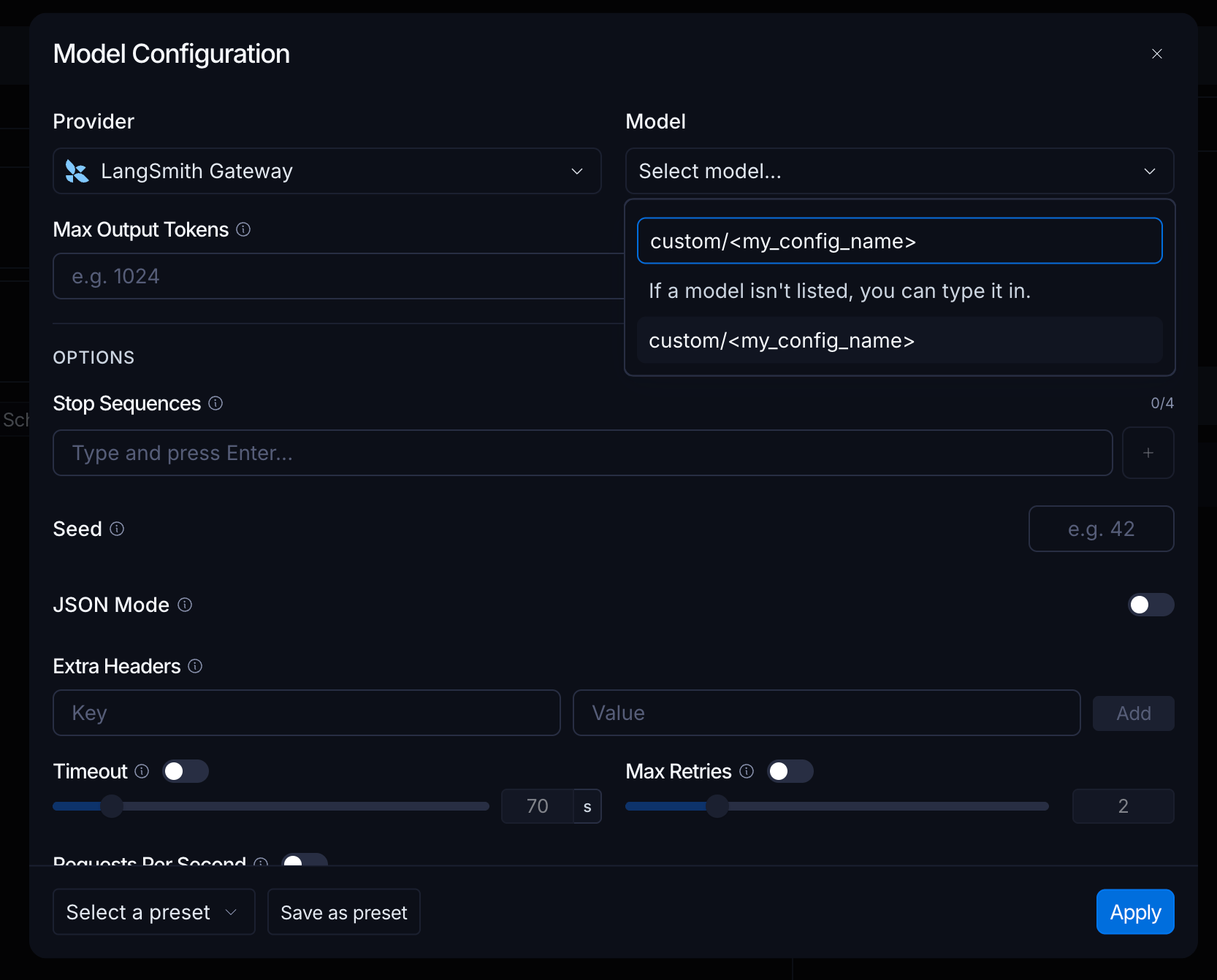
3. [Create a prompt](/langsmith/create-a-prompt) in the Playground. Open **Model Configuration**, select **LangSmith Gateway** as the **Provider**, and enter `custom/<my_config_name>` in the **Model** field. Replace `<my_config_name>` with the saved configuration's name, without angle brackets. You can type the value even if it is not listed. Click **Apply**.
   <img src="https://mintcdn.com/langchain-5e9cc07a-preview-docsby-1791319236-3be7a15/sI3u-GEVLrc6hNCo/images/llm-gateway-prompt-model-configuration.png?fit=max&auto=format&n=sI3u-GEVLrc6hNCo&q=85&s=97a2c7b47b4e7e24fceadaf488e062eb" alt="Model Configuration dialog with LangSmith Gateway selected as the provider and custom/<my_config_name> entered in the Model field." data-og-width="1666" width="1666" data-og-height="1342" height="1342" data-path="images/llm-gateway-prompt-model-configuration.png" data-optimize="true" data-opv="3" srcset="https://mintcdn.com/langchain-5e9cc07a-preview-docsby-1791319236-3be7a15/sI3u-GEVLrc6hNCo/images/llm-gateway-prompt-model-configuration.png?w=280&fit=max&auto=format&n=sI3u-GEVLrc6hNCo&q=85&s=b2c6d300c8751ddb069bfb49255d7176 280w, https://mintcdn.com/langchain-5e9cc07a-preview-docsby-1791319236-3be7a15/sI3u-GEVLrc6hNCo/images/llm-gateway-prompt-model-configuration.png?w=560&fit=max&auto=format&n=sI3u-GEVLrc6hNCo&q=85&s=a93ffe478aff5d488bd38480f8a137e4 560w, https://mintcdn.com/langchain-5e9cc07a-preview-docsby-1791319236-3be7a15/sI3u-GEVLrc6hNCo/images/llm-gateway-prompt-model-configuration.png?w=840&fit=max&auto=format&n=sI3u-GEVLrc6hNCo&q=85&s=e35781c2df5adf03263adfde080fb4a4 840w, https://mintcdn.com/langchain-5e9cc07a-preview-docsby-1791319236-3be7a15/sI3u-GEVLrc6hNCo/images/llm-gateway-prompt-model-configuration.png?w=1100&fit=max&auto=format&n=sI3u-GEVLrc6hNCo&q=85&s=6a62e4417dc0a7de7b7204904c6ffd51 1100w, https://mintcdn.com/langchain-5e9cc07a-preview-docsby-1791319236-3be7a15/sI3u-GEVLrc6hNCo/images/llm-gateway-prompt-model-configuration.png?w=1650&fit=max&auto=format&n=sI3u-GEVLrc6hNCo&q=85&s=e7b9c4fe11ff72f7da951f65dc17cb82 1650w, https://mintcdn.com/langchain-5e9cc07a-preview-docsby-1791319236-3be7a15/sI3u-GEVLrc6hNCo/images/llm-gateway-prompt-model-configuration.png?w=2500&fit=max&auto=format&n=sI3u-GEVLrc6hNCo&q=85&s=ed8bc9e33b1b719d2a957e05c265b7b8 2500w" />

4. **Save** the prompt, then [pull it with its model](/langsmith/manage-prompts-programmatically#pull-a-prompt). In Python, set `include_model=True` when calling `client.pull_prompt` so the saved Gateway model configuration is included.

Invoke the pulled prompt with its saved model to send requests through the gateway and apply the configuration's fallback chain. Pulling only the prompt template does not include the model configuration.

The fallback chain belongs to the model configuration, not the prompt itself. Prompts that reference the same configuration share its fallbacks. Use a separate configuration for each prompt that needs different fallback behavior.

## Choose fallback candidates

You can add two types of fallback candidates:

* **Direct provider model**: select a supported gateway provider and model. This option uses the workspace's secret for that provider, or Gateway Credits for eligible hosted models.
* **Model configuration**: select a saved [model configuration](/langsmith/model-configurations). Use this option for a custom OpenAI-compatible or Anthropic endpoint, a custom model name, or configuration-specific parameters.

A fallback chain can use model configurations from its selected workspace or organization. If both scopes contain a configuration with the same name, LLM Gateway uses the workspace-scoped configuration, including for the primary model.

For example, configure `anthropic/claude-opus-5` as the primary model, `openai/gpt-5.4-mini` as the first fallback, and a saved OpenAI-compatible model configuration as the second fallback. The application continues to request `anthropic/claude-opus-5`; the gateway selects and translates fallback calls when needed.

## See also

* [API formats](/langsmith/llm-gateway-api-formats): review supported request formats and translation behavior.
* [Spend policies](/langsmith/llm-gateway-spend-policies): apply cost limits alongside fallback routing.

***

<div className="source-links">
  <Callout icon="terminal-2">
    [Connect these docs](/use-these-docs) to your agent of choice via MCP for real-time answers.
  </Callout>

  <Callout icon="edit">
    [Edit this page on GitHub](https://github.com/langchain-ai/docs/edit/main/src/langsmith/llm-gateway-fallbacks.mdx) or [file an issue](https://github.com/langchain-ai/docs/issues/new/choose).
  </Callout>
</div>
