

Self-hosted Engine requires LangSmith Helm chart
0.16.0 or later and a license that includes the Engine entitlement. It is not available on earlier chart versions. Contact our sales team to have the entitlement added to your order.Running Engine on your own model providers and air-gapped installations require LangSmith Helm chart 0.17.0 or later. Earlier chart versions run Engine only on LangSmith Intelligence.- LangSmith Intelligence (LSI): a LangChain-managed zero data retention (ZDR) service that runs Engine’s models for you.
- Your own model providers: Anthropic, OpenAI, Amazon Bedrock, Google Vertex AI, or Azure AI Foundry, with credentials or cloud identity you control.
Red teaming and automatic issue validation are unavailable on self-hosted LangSmith. You can investigate issues, generate fixes, and open PRs without those features.
- Code (optional): Your agent’s source, which Engine reads to diagnose issues and propose fixes.
- Traces: Runtime data from your agents, which can include user messages, tool outputs, and PII.
Choose how Engine runs its models
Each organization chooses how Engine runs its models under Settings > Engine > Model providers.
For LangSmith Intelligence in other clouds or regions, contact our sales team.
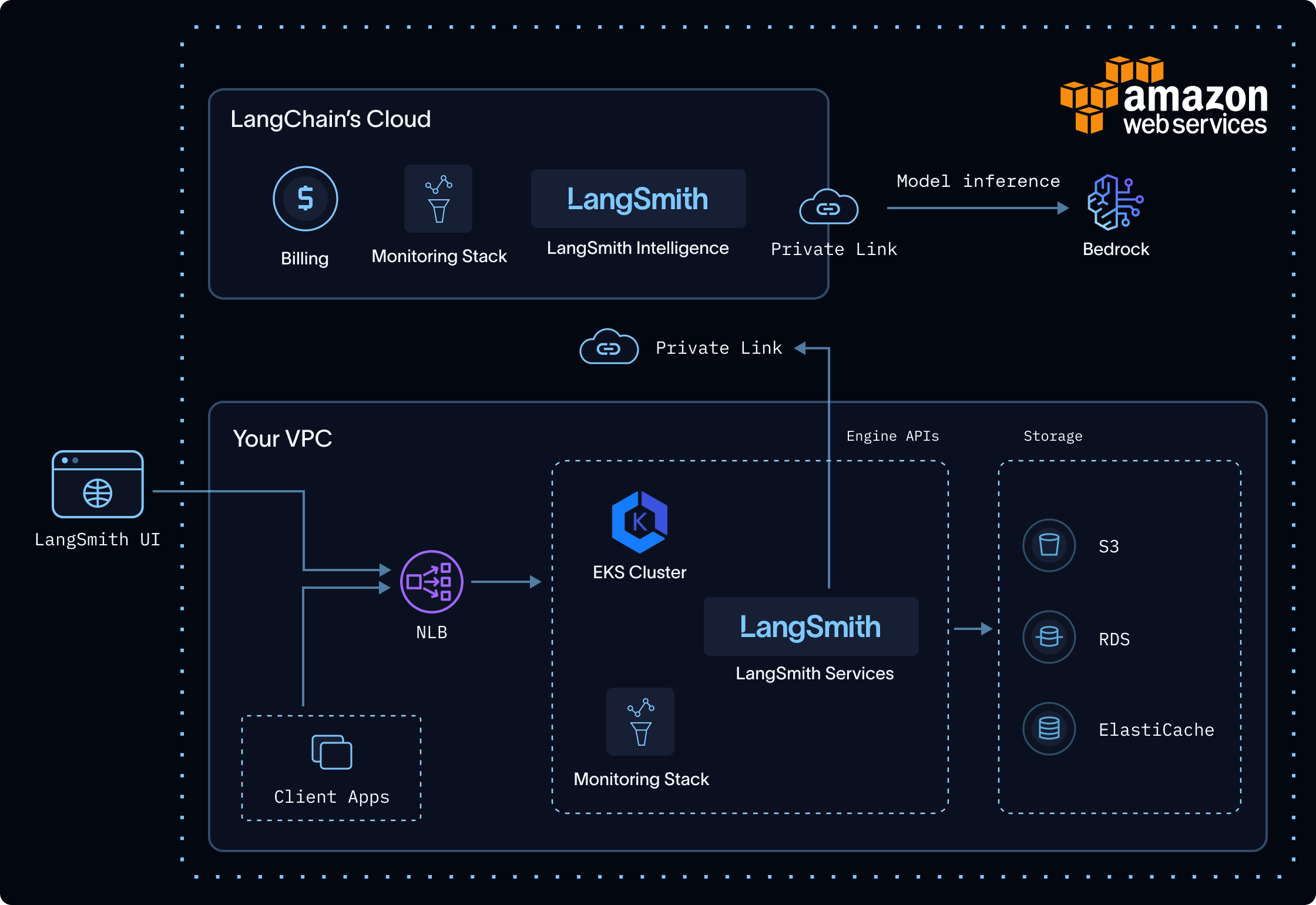
LangSmith Intelligence: Engine runs in your VPC; LSI and Bedrock run in LangChain's AWS environment.
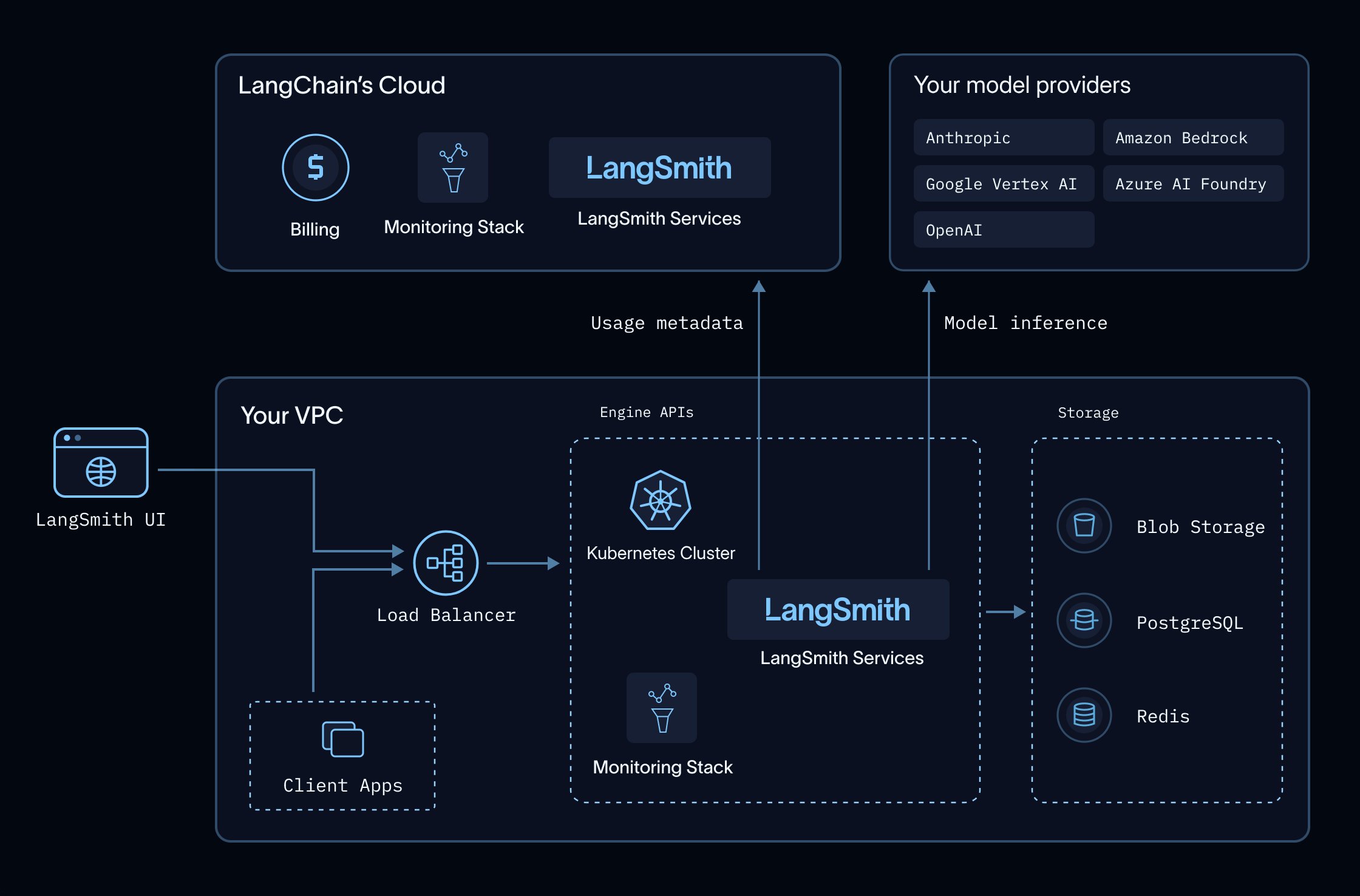
Your own model providers: Engine runs in your VPC and calls your providers directly; only usage metadata goes to LangChain.
LangSmith Intelligence
LSI is a LangChain-managed service that runs Engine’s models. Engine sends its model requests tohttps://beacon.aws.langchain.com/intelligence, authenticated with your LangSmith license, so you don’t provide model-provider credentials. Each request carries the trace content, code, and intermediate outputs Engine needs to do its work.
Engine uses different models, each tuned for its role, to cluster issues, diagnose root causes against your code, generate fixes, and write evaluators that verify them. LangChain tunes these models for quality and token efficiency, and updates them as better models become available.
Your cluster must allow outbound HTTPS to that gateway. The connection can use public egress or private connectivity. To keep Engine traffic on private networking, follow Connect with AWS PrivateLink.
If the connection to LSI is unavailable, Engine stops and returns an error. The rest of your LangSmith deployment is unaffected, and Engine tries again on its next scheduled scan.
Your own model providers
Engine calls your providers directly from your cluster. Prompts and responses go only to your provider, under your agreement with that provider. LangChain doesn’t receive them. Sandbox usage by Engine is included in Engine’s LSU billing. The sandboxes Engine uses to diagnose issues, generate fixes, and write evaluators do not incur additional Sandboxes product charges. Engine supports Anthropic, OpenAI, Amazon Bedrock, Google Vertex AI, and Azure AI Foundry. It uses a mix of models from the providers you select, so for the best results, add credentials for every provider you have access to. Enable access to Anthropic’s Claude models and OpenAI’s GPT models in your provider accounts, where your provider offers them. On Azure, use an Azure AI Foundry resource. To confirm that Engine can reach the models it uses, run Test connection.Where Engine processes and stores data
In a self-hosted deployment, Engine separates data handling between your environment and LangChain’s:- Your environment: Engine orchestration and LangSmith-stored traces remain in your self-hosted environment.
- LangChain’s environment, with LangSmith Intelligence: LSI and the model provider process content that Engine sends. LSI retains only usage metadata.
- Your model providers, with your own providers: Your providers process content that Engine sends, under your agreements with them. LangChain receives only usage metadata.
What LangSmith Intelligence retains
LSI does not persist the content of prompts or model responses. It retains the following metadata for usage attribution and billing:- Account, workspace, and project identifiers used to attribute usage.
- Model and token-usage metadata used for billing.
engine.intelligenceBaseUrl every hour, authenticated with your license.
For LangChain-managed inference, the model-provider retention and training commitments are described in Engine security. When you use your own providers, their retention and training policies depend on your agreements with them.
Install Engine
Engine is disabled by default. It requires Sandboxes, a connection to LangSmith Intelligence unless your installation is air-gapped, an externally reachableconfig.hostname, and Engine’s keys. Complete the prerequisites before enabling Engine.
Engine and Insights run from the same image and share one deployment. Insights is not required for Engine. If your installation already runs Insights, enabling Engine adds configuration rather than new pods.
Components
Enabling Engine provisions or reuses:standalone-insights-api-server: serves both theengineandinsightsgraphs.standalone-insights-queue: background run processing for Engine and Insights.- A dedicated PostgreSQL and Redis instance for the shared deployment, each replaceable with an external instance.
- The sandbox components described under Enable Sandboxes.
platform-backend and ingest-queue, which dispatch and schedule its runs.
Prerequisites
1
Enable Sandboxes
Complete Enable Sandboxes first, including the KVM-capable node pool and JuiceFS storage.Engine’s sandboxes are associated with one workspace. An install with Engine must have a shared organization. If the shared organization has exactly one workspace, LangSmith uses that workspace. If the shared organization has more than one workspace, LangSmith does not choose one automatically. You must set
engine.sandboxTenantId to the workspace ID.2
Confirm the license entitlement
Engine is licensed separately, in the same way as Sandboxes. Your license must carry the Engine entitlement. LangSmith validates your license key against
https://beacon.langchain.com at startup and periodically thereafter, so the entitlement takes effect without you changing any configuration once it is added to your order.3
Allow egress to LangSmith Intelligence and your model providers
Set
engine.intelligenceBaseUrl for how Engine will run its models, and allow outbound HTTPS from the cluster to that URL:The AWS URL also records usage, so it works for organizations on either option. The default URL only records usage, on the same host self-hosted LangSmith already uses for license verification and billing telemetry, so it adds a path rather than a new egress destination.If Engine will run on your own model providers, also allow outbound HTTPS from the
standalone-insights pods to each provider’s API endpoint. To keep that traffic on private networking, see Connect to your providers privately.Add each destination as a specific allowlist entry rather than opening general egress. To keep traffic to LangSmith Intelligence on private networking, connect with AWS PrivateLink. Requests to LangSmith Intelligence use a short-lived license JWT obtained during LangSmith license verification. Engine’s traffic is separate from the billing and operational telemetry described in Configure egress, even where it shares a host.4
Verify your hostname is externally reachable
Engine’s sandboxes call your LangSmith install using the
langsmith CLI, so config.hostname must be reachable from the sandbox network. Helm validation rejects localhost and in-cluster *.svc addresses.Serve that hostname through your ingress with TLS, as described in Set up an ingress. Engine’s sandbox network policy permits access to your LangSmith hostname, the configured GitHub hosts, and the Python package registries. Per-run credentials are injected by a proxy outside the sandbox rather than being readable inside it.For GitHub connections, also allow the outbound requests and inbound webhooks required by your GitHub environment. Browser access to LangSmith alone does not establish webhook connectivity from GitHub.5
Generate Engine's keys
Engine needs two keys of its own:
-
Encryption key (
engine_encryption_key): a Fernet key that encrypts the run payloads LangSmith passes to Engine, which carry short-lived credentials. -
Usage signing secret (
engine_usage_signing_secret): signs the usage reports Engine sends to LangSmith. Use at least 32 random characters.
helm template and GitOps renders skip that lookup, so verify the keys are present separately.To rotate the encryption key, copy the current value to engine_encryption_key_previous and set the new key as engine_encryption_key. The previous key is accepted for decryption only, so runs encrypted just before the swap still complete.When introducing or rotating the usage signing secret, pause new Engine work and wait for running scans to finish. Update platform-backend, ingest-queue, and the shared Engine and Insights API server and queue to use the same signing secret. After all four components are healthy, resume Engine and verify an analysis and Engine usage. The previous encryption key does not provide a fallback for usage signatures.Enable with Helm
Add the following to yourlangsmith_config.yaml, alongside the complete Sandboxes values from Enable Sandboxes. These examples show only the Engine-specific values and the sandboxes.enabled flag.
- Using Kubernetes secrets (recommended)
- Using inline values
Reference your existing Secret by name. The chart reads
engine_encryption_key and engine_usage_signing_secret from it.If your install has a shared organization with more than one workspace, set the workspace that owns Engine’s sandboxes:
Use cloud identity for your model providers
Amazon Bedrock, Google Vertex AI, and Azure AI Foundry can authenticate with the cloud identity of Engine’s pods instead of credentials saved in LangSmith. List those providers inengine.workloadIdentityProviders. Configure identity for both the API server and queue of the shared Engine and Insights deployment:
- Amazon EKS
- Google GKE
- Azure AKS
Configure IAM roles for service accounts (IRSA). Trust the namespace and service account of both Engine workloads, and grant the role access to the Bedrock models Engine uses.
Verify the installation
Confirm the shared Engine and Insights deployment is running:Running. Then, confirm platform-backend is healthy, since it dispatches Engine runs:
engine.intelligenceBaseUrl.
Turn on Engine in LangSmith
Enabling Engine in Helm makes the feature available; it does not start any scans. After enabling the chart values, finish setup in LangSmith:- An Organization Admin turns Engine on for the organization under Settings > Engine. For more information, see Find and fix issues.
- An Organization Admin chooses how Engine runs its models under Settings > Engine > Model providers. Engine doesn’t start any runs until this is saved.
- A user whose role can update tracing projects turns on Engine for a tracing project from its Engine tab. For more information, see Set up Engine.
Choose model providers
Under Settings > Engine > Model providers, an Organization Admin selects LangSmith Intelligence, one or more of your own providers, or both. Credentials are saved as organization secrets and apply to every workspace in the organization. LangSmith Intelligence appears only when your installation’sengine.intelligenceBaseUrl serves Engine’s models.
When LangSmith Intelligence is available and selected, it takes priority over your selected providers. Leave it unselected to keep inference on your own providers.
Engine selects models from the providers you enable. Enable access to Claude 5.5-class models or GPT 5.6-class models in your provider accounts, depending on which models each provider offers. Model requirements follow the Engine image tag in images.engineInsightsAgentImage.tag, not the Helm chart version. Run Test connection to identify the required models and confirm access for your installed Engine image.
To use your own providers:
1
Add credentials
Click Add credentials next to the provider and enter:A provider with complete credentials shows as configured. To change them later, click the key icon next to the provider.
- Anthropic
- Amazon Bedrock
- Google Vertex AI
- Azure AI Foundry
- OpenAI
An Anthropic API key.
2
Test the provider
Click Test connection. Engine sends a small request to each model it uses on that provider, with the saved credentials or configured cloud identity. It shows whether each request succeeded and, if not, why.
3
Select providers and save
Select the providers Engine may use, then save.
- No provider selected: Engine doesn’t start runs until at least one provider is selected and saved.
- Rejected credentials: Test connection reports which provider rejected them. Update the credentials and test again.
- Model not available: enable the model in your provider account, then test again.
Disable Engine
Setengine.enabled to false and re-apply:
standalone-insights pods keep running when insights.enabled is true.
Connect privately
Engine works over public egress. To keep its traffic on private networking, connect to LangSmith Intelligence with AWS PrivateLink, or connect to your own model providers through your cloud’s private endpoints.Connect with AWS PrivateLink
The LangSmith Intelligence gateway,beacon.aws.langchain.com, routes requests to Amazon Bedrock in LangChain’s AWS environment.
Before configuring PrivateLink, complete Install Engine, including its Helm and egress configuration.
AWS PrivateLink routes Engine traffic from your VPC to LSI without exposing that traffic to the public internet. The LSI endpoint service is hosted in us-east-2, and AWS supports access from VPCs in other regions.
Before you begin, collect your AWS account ID, VPC ID, private subnet IDs, and a security group for the interface endpoint. Configure that endpoint security group to allow inbound TCP traffic on port 443 only from the security group attached to the nodes or workloads that run Engine, or from the smallest private CIDR that contains them. Do not allow 0.0.0.0/0.
To connect your VPC to LSI:
1
Request access
Contact your account representative or sales@langchain.dev with your AWS account ID. LangChain adds your account to the endpoint service’s allowed principals list.
2
Create the interface VPC endpoint
Configure the AWS provider for the region that contains your VPC. Keep
service_region set to us-east-2, including when your VPC is in another region. Select one private subnet per availability zone.The
service_region argument requires HashiCorp AWS provider 5.82.0 or later.3
Wait for LangChain to accept the connection
The endpoint status changes from
pendingAcceptance to available after LangChain accepts the connection. Allow a few minutes for the change to propagate before testing connectivity.4
Route the LSI hostname to the endpoint
Enable DNS resolution and DNS hostnames for your VPC. Then, create a Route 53 private hosted zone and alias record so If workloads use a corporate DNS resolver instead of the Amazon-provided resolver, configure conditional forwarding to Route 53 Resolver or create an equivalent private DNS override for
beacon.aws.langchain.com resolves to the VPC endpoint inside your VPC. Keep this hostname unchanged so TLS certificate validation succeeds. The private hosted zone also prevents fallback to public DNS when the endpoint is unavailable.beacon.aws.langchain.com that points to the endpoint DNS name.5
Verify private connectivity
From a node or container that runs Engine, resolve the gateway hostname:Confirm that the result contains the private IP addresses assigned to the endpoint network interfaces. Then start an analysis and confirm that it completes successfully. If the analysis does not complete, review the Engine installation and egress configuration.
Connect to your providers privately
Engine calls each provider’s standard API hostname from thestandalone-insights pods. To keep that traffic off the public internet, set up your cloud’s private connection to the provider so the same hostname resolves to private addresses inside your network:
Engine doesn’t accept custom endpoint URLs, so private connectivity works through DNS: the standard hostname must resolve to your private endpoint from the Engine pods.
If Engine authenticates with cloud identity, the pods also need to reach your cloud’s token service, such as an interface VPC endpoint for AWS STS on AWS.
With saved Vertex AI service account JSON, also allow HTTPS to
oauth2.googleapis.com for token exchange, alongside aiplatform.googleapis.com for inference.
Usage reporting to LangSmith Intelligence is a separate connection. On AWS, https://beacon.aws.langchain.com/intelligence records usage and supports AWS PrivateLink, so an installation can run Engine on Bedrock and report usage without public egress. The default https://beacon.langchain.com/intelligence needs public egress.
Air-gapped installations
Installations with an offline license and no connection to LangSmith Intelligence can run Engine on their own model providers:- Set
engine.intelligenceBaseUrlto"". - Choose your own model providers under Settings > Engine > Model providers. LangSmith Intelligence isn’t available.
- Allow outbound HTTPS from the
standalone-insightspods to your model providers, or route it through your own network path to them.
0 aren’t enforced. Set a limit of 0 to pause Engine for an organization or a project.
See also
- Engine
- Configure Engine
- Connect Engine to GitHub
- Engine security
- Engine notifications
- Connect self-hosted LangSmith to Slack
- Enable additional LangSmith features
Connect these docs to your agent of choice via MCP for real-time answers.